
The best mortgage calculators do more than spit out a single monthly payment. They let you enter full PITI (principal, interest, taxes, insurance) plus PMI and HOA dues, and they let you test low, base, and high interest-rate scenarios side by side. Pick a tool with those features, plug in real numbers for your area, and run three rate scenarios before you trust any output. Ficustree’s calculators are built around exactly that approach.
TL;DR:
- Use a mortgage calculator that includes full PITI, PMI, and HOA inputs, and test multiple interest rate scenarios to reflect possible rate changes before committing.
- Always enter county-specific property taxes and real homeowners insurance quotes to avoid underestimating your true monthly obligations.
- Remember that a 1% increase in interest rate on a $200,000, 30-year loan raises monthly payments by approximately $119, which can significantly impact affordability.
- Export and compare amortization schedules across different rates to understand the total interest paid and payoff timeline for better decision-making.
- Avoid relying on default values for taxes, insurance, PMI, or HOA fees, and treat calculator outputs as ranges rather than fixed figures to account for variability.
Table of Contents
- What Do the Best Mortgage Calculators Actually Do?
- How to Choose the Right Mortgage Calculator for Your Situation
- How to Use a Mortgage Calculator Correctly
- Common Mortgage Calculator Mistakes and Pro Tips
- How Calculators Handle Credit Scores and Loan Qualification
- Making Sense of What Your Calculator Is Telling You
- Where Online Calculators Fall Short of Professional Advice
- Affordability Calculators, Amortization Schedules, and Refinance Tools Are Not the Same
- How Extra Payments and Biweekly Schedules Change Your Payoff Timeline
- Why Ficustree Builds Mortgage Calculators Differently
- Try Ficustree’s Mortgage Calculator Before You Shop
- Sources
- FAQ
What Do the Best Mortgage Calculators Actually Do?
A calculator that only asks for loan amount, term, and rate is giving you half the picture. The other half, taxes, insurance, PMI, and HOA dues, is where most first-time buyers get blindsided. PITI stands for principal, interest, taxes, and insurance, and lenders typically prefer a front-end housing ratio near a third of your gross monthly income. If a calculator skips three of those four letters, it’s not really estimating your payment. It’s estimating a fraction of it.
The strongest tools separate each cost so you can see exactly where your money goes:
- Loan amount and term, adjustable independently from the purchase price so you can model different down payments.
- Interest rate, with room to test more than one number at a time.
- Property taxes, entered as your actual county rate, not a national average.
- Homeowners insurance, based on a real quote rather than a placeholder.
- PMI, triggered automatically when your down payment falls under 20%.
- HOA or condo dues, added as a flat monthly line item.
Beyond the core inputs, a handful of extra features separate a decent calculator from a genuinely useful one. Amortization export lets you download or print the full payment schedule so you can see how much of each payment goes to interest in year one versus year twenty. Side-by-side scenario comparison shows two or three rate and down-payment combinations at once instead of forcing you to write numbers down and recalculate manually. Adjustable-rate modeling matters if you’re considering an ARM, since a fixed-rate calculator won’t show how payments could change after the intro period ends. Each of these features exists for one reason: to close the gap between what a calculator predicts and what your lender eventually quotes.
How to Choose the Right Mortgage Calculator for Your Situation
Not every buyer needs the same tool. Someone comparing lenders three weeks before closing has different needs than someone who just started browsing listings. A quick checklist cuts through the noise:
- Full PITI support. If the calculator can’t add taxes and insurance as separate line items, skip it.
- PMI and HOA fields. These need to be optional inputs you control, not baked-in assumptions you can’t see.
- Rate scenario slots. Look for a tool that lets you compare at least two or three interest rates without starting over each time.
- Exportable amortization. You’ll want this if you plan to share numbers with an agent or lender.
- Clear, editable defaults. A calculator that hides its assumptions (or won’t let you change them) is a liability, not a convenience.
First-time buyers usually get the most value from a calculator that emphasizes affordability and PITI clarity over advanced amortization tools. Buyers actively rate shopping benefit more from scenario comparison and amortization export, since the goal is comparing offers, not just estimating a payment. Someone considering a refinance needs a calculator built around comparing an existing loan balance and rate against a new one, which is a different math problem than a purchase calculator solves.
Pro Tip: Once your estimated numbers land within a range you’re comfortable with, stop calculating and start the pre-qualification process. A prequalification calculator or a lender’s own intake gives you lender-specific pricing that no public calculator can replicate, since it pulls your actual credit profile.
How to Use a Mortgage Calculator Correctly
Garbage in, garbage out applies to mortgage math just as much as anywhere else. Here’s the sequence that produces numbers you can actually act on:
- Set your loan amount as purchase price minus a realistic down payment, not the maximum you’re hoping to save.
- Run three interest-rate scenarios: a low rate, a middle-of-the-road rate, and a high rate that accounts for the possibility rates move before you close.
- Add your county’s actual property tax rate instead of the calculator’s national default.
- Get a real homeowners insurance quote and enter that figure instead of guessing.
- Add PMI if your down payment is under 20%.
- Add HOA or condo fees if the property has them.
- Compare the amortization output across your three rate scenarios and note the total interest paid over the life of the loan, not just the monthly payment.
The rate-scenario step matters more than most buyers realize. A 1% increase in interest rate on a $200,000, 30-year loan raises the monthly principal-and-interest payment by roughly $119, according to the Consumer Financial Protection Bureau. That’s not a rounding error. It’s the difference between a payment that fits your budget and one that doesn’t, and it’s exactly why testing a single rate gives you a false sense of certainty.
Once you’ve run your scenarios, export the amortization schedule and bring it to your agent or lender. Seeing the numbers side by side, rather than as three separate screenshots, makes it much easier to spot which scenario actually makes sense for your timeline.
Common Mortgage Calculator Mistakes and Pro Tips
The single biggest mistake is trusting default values for taxes and insurance. National averages can be off by hundreds of dollars a month depending on where you’re buying, and Fannie Mae’s own guidance recommends entering county-specific tax figures and real insurance quotes instead of relying on built-in estimates.
The second mistake is ignoring PMI and HOA entirely. Skipping PMI on a low down payment or leaving out HOA dues on a condo can significantly understate your real monthly obligation, since PMI and HOA fees vary widely by loan-to-value and association but rarely show up in a calculator’s default view.
The third mistake is single-rate thinking, running one number and treating it as gospel instead of a starting point.
- Pull your local tax assessor’s records instead of guessing.
- Get two or three homeowners insurance quotes before you finalize a number.
- Always test at least three interest rates.
- Validate your results with a formal pre-qualification before you shop seriously.
Pro Tip: A buyer estimating payments on a $350,000 home who forgets PMI and a $250 monthly HOA fee could be underestimating their real payment by $400 or more. That gap is often the difference between a house that fits comfortably and one that strains the budget every month.
How Calculators Handle Credit Scores and Loan Qualification
Most public mortgage calculators don’t ask for your credit score at all, and that’s a meaningful blind spot. The interest rate you plug in is a guess based on published averages, not the rate you’ll actually qualify for. Lenders price loans using your credit score, debt-to-income ratio, loan-to-value ratio, and loan type together, and a calculator has no way to see any of that.
This is why the gap between a calculator’s estimate and your actual closing numbers often comes down to credit-driven pricing. Practitioners who work in mortgage lending note that calculator estimates typically land within a single-digit percentage range of final terms, with the variance driven mostly by credit score tiers and lender-specific fees that no calculator can model in advance.
A handful of newer calculators, including affordability-focused tools, let you enter a credit score range as a rough proxy, adjusting the assumed interest rate up or down based on typical pricing tiers. That’s a helpful improvement, but it’s still an estimate. The only way to know your real rate is to let a lender pull your actual credit file during pre-qualification. Treat any calculator’s rate assumption as a placeholder, not a promise, especially if your credit score sits outside the “excellent” range.
Making Sense of What Your Calculator Is Telling You
A monthly payment number by itself doesn’t tell you much. What matters is how that number moves when you change one input at a time. If shifting from a 6% to a 7% rate pushes your payment past your comfort zone, that tells you something concrete about how much rate risk you can absorb before you lock anything in.
Pay attention to the ratio between principal-and-interest and everything else. If taxes, insurance, PMI, and HOA make up close to half your total payment, that’s a signal you’re buying in a higher-cost tax jurisdiction or a property with heavier ongoing fees, both worth factoring into your search criteria, not just your monthly budget.
Look at total interest paid over the loan term, not just the monthly figure. Two loans with similar monthly payments can have wildly different total interest costs depending on the rate and term, and that number only shows up in the amortization schedule, not the headline payment.
Finally, treat every output as a range, not a single fixed answer. Between the rate uncertainty, the tax and insurance estimates, and the credit-score variable calculators can’t fully account for, a swing of a few hundred dollars in either direction is normal. Use the low and high ends of your scenarios to set a budget ceiling, and don’t anchor too tightly to the middle number just because it feels the most comfortable.
Where Online Calculators Fall Short of Professional Advice
A calculator is a planning tool, not a lender. It can’t see your credit report, your debt-to-income ratio, or the specific loan programs you qualify for, and it has no way to account for closing costs, rate locks, or underwriting conditions that vary by lender.
Calculators also don’t model recurring costs beyond PITI. Maintenance reserves, ongoing repair costs, and the general expense of owning a home are largely absent from calculator outputs, even though they’re a real part of your monthly budget once you own the place. Treat your calculator’s number as the floor of what homeownership costs, not the ceiling.
This is where formal pre-qualification earns its place in the process. A lender pulling your actual credit and income documentation will give you a rate and loan amount specific to your financial profile, something no public calculator can replicate. Financial advisors and loan officers can also weigh in on questions calculators simply aren’t built to answer: whether an adjustable-rate loan makes sense given how long you plan to stay in the home, or whether paying points to buy down your rate is worth the upfront cost.
Use calculators to narrow your range and build confidence before you talk to anyone. Use professional advice to finalize the number you actually commit to.
Affordability Calculators, Amortization Schedules, and Refinance Tools Are Not the Same
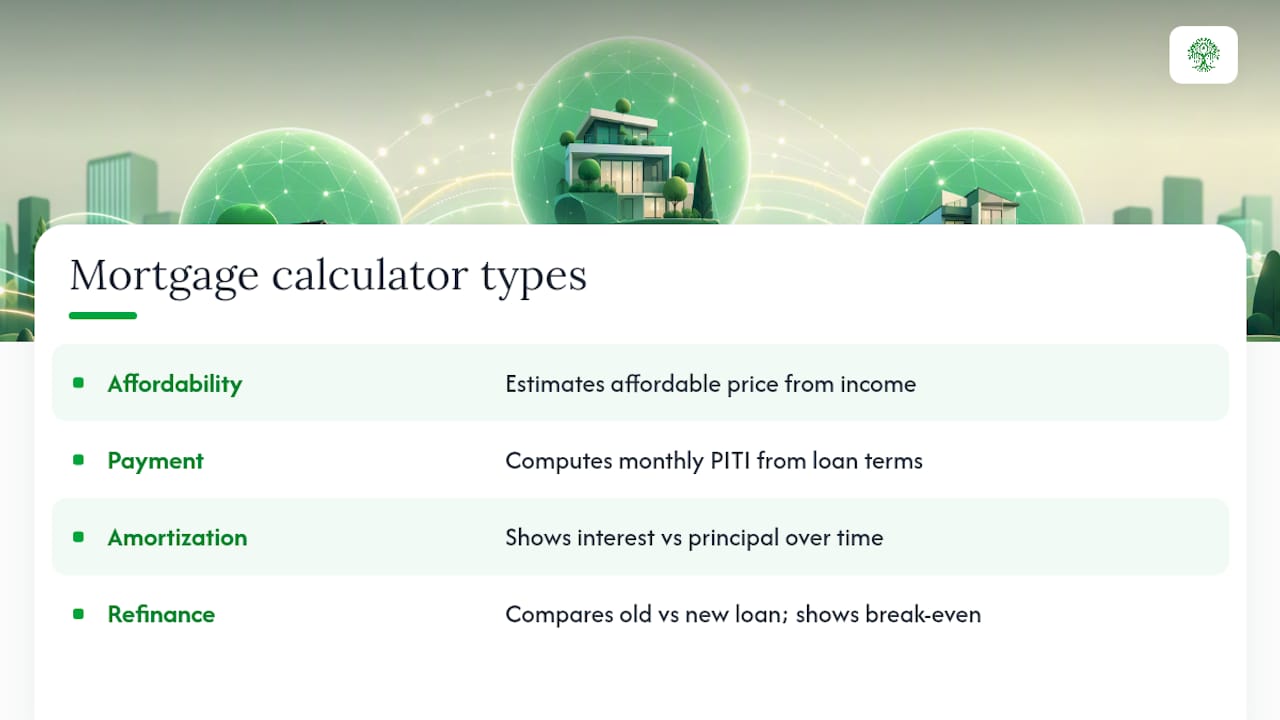
Lumping every mortgage calculator into one category is part of why so many buyers get confused. They solve different problems.
An affordability calculator works backward from your income and debts to estimate how much house you can reasonably afford, factoring in front-end and back-end debt-to-income limits. It’s the right starting point before you’ve picked a specific property.
A payment calculator works forward from a specific loan amount, rate, and term to show your estimated monthly PITI. This is the tool you use once you’ve found a property or a price range you’re targeting.
An amortization calculator breaks that payment down over time, showing exactly how much of each payment goes toward interest versus principal in year one compared to year fifteen. Amortization schedules typically include the option to model extra payments, which is useful once you’re deciding whether an accelerated payoff strategy makes sense.
A refinance calculator compares your current loan’s remaining balance and rate against a new loan’s terms, factoring in closing costs to calculate a break-even point. It answers a completely different question than a purchase calculator: not “can I afford this,” but “does refinancing save me money before I plan to sell or move.”
Using the wrong type for your situation is a common source of confusion, not because any of them are inaccurate, but because they answer different questions.
How Extra Payments and Biweekly Schedules Change Your Payoff Timeline
Most amortization-capable calculators let you model extra principal payments, either as a one-time lump sum, a recurring monthly add-on, or a switch to a biweekly payment schedule. The mechanics are worth understanding because the payoff impact is larger than most buyers expect.
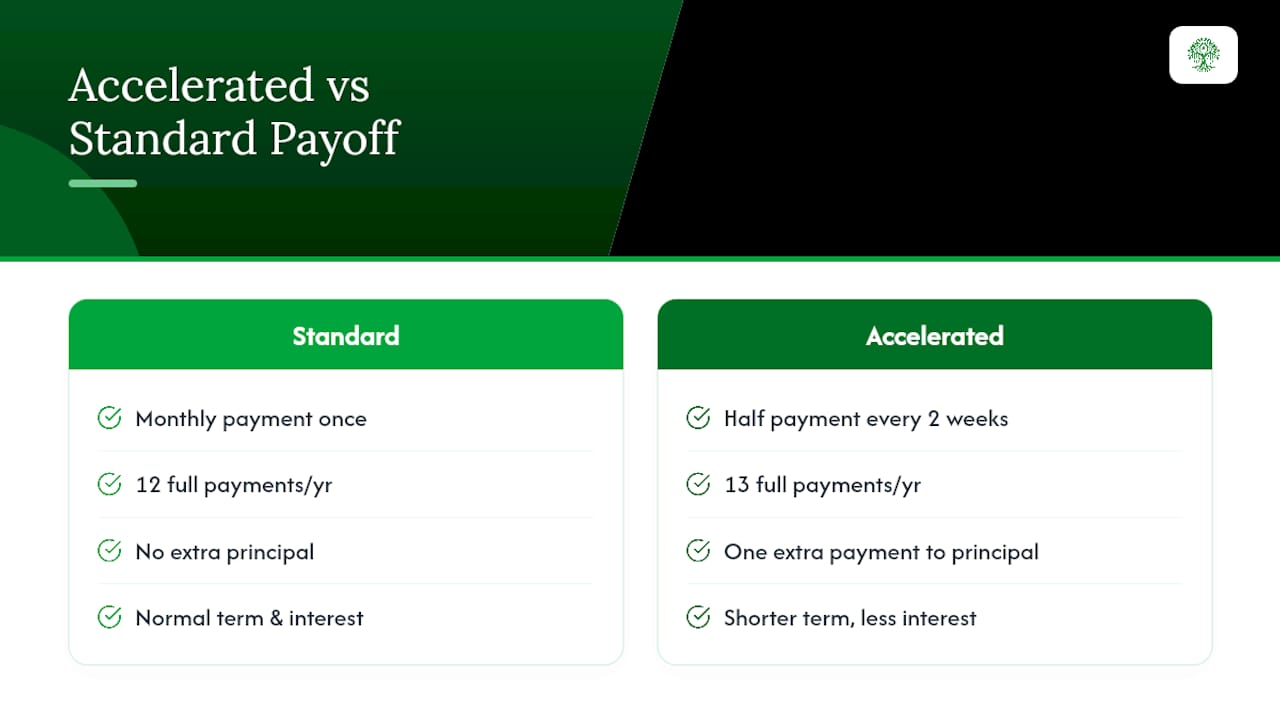
A biweekly schedule splits your monthly payment in half and collects it every two weeks instead of once a month. Since there are 52 weeks in a year, that works out to 26 half-payments, the equivalent of 13 full monthly payments instead of 12. That one extra payment a year goes straight to principal, which shortens your loan term and reduces total interest paid.
Adding even a modest extra amount to your monthly principal payment compounds the same way. Because interest is calculated on your remaining balance, every extra dollar toward principal early in the loan reduces the interest charged in every subsequent month. A partner resource on amortization walks through this concept in more detail if you want to see the mechanics laid out step by step.
The best calculators let you toggle this feature on and compare two amortization schedules side by side, standard versus accelerated, so you can see the exact difference in payoff date and total interest before committing to a strategy. If your calculator doesn’t offer this, Ficustree’s amortization tool shows both schedules together so the tradeoff is visible at a glance.
Why Ficustree Builds Mortgage Calculators Differently
Most calculators treat PITI as an afterthought, one line buried under a headline payment number. Ficustree’s decision-intelligence approach starts from the opposite direction: PMI, HOA, and localized tax and insurance data are built into the core inputs, not optional extras you have to hunt for.
{{brand_signal:proprietary_calculator_engine}}
{{brand_signal:localized_tax_insurance_data}}
That structure exists because first-time buyers need affordability guidance grounded in their actual market, not a national average.
{{author_bio:anand}}
{{case_study:ficustree_buyer_outcomes}}
— Anand
Try Ficustree’s Mortgage Calculator Before You Shop
Running the numbers yourself is a solid start, but pairing that with a platform built specifically for first-time buyers changes what happens next. Ficustree’s mortgage calculator includes full PITI, PMI, and HOA inputs by default, plus scenario comparison so you can test three rates without re-entering your numbers each time.

The premium platform is free to use, including the calculators, neighborhood insights, and step-by-step guides that walk you from a rough budget to a specific price range. If you decide you want direct representation once you’re ready to make offers, Ficustree charges a flat $1,000 at closing plus 1% commission, with a rebate of roughly 2% passed back to you where legally permitted. You also get access to on-demand showing agents, so you’re not waiting days for a tour. Once your affordability numbers feel solid, the natural next step is checking your true affordability range and seeing what that translates to in your target neighborhoods. Start with the Ficustree buyer platform to see how the calculators connect directly to representation when you’re ready to make an offer.
Sources
- Your mortgage calculator may be setting you up for a surprise — Consumer Financial Protection Bureau
- Mortgage calculator — Fannie Mae
FAQ
Which Mortgage Calculator Is the Most Accurate?
No calculator is perfectly accurate because none can see your actual credit profile or lender-specific pricing. The most reliable ones are those with full PITI support, editable PMI and HOA fields, and rate-scenario testing, since accuracy depends far more on the inputs you provide than the tool itself.
What Is the 3-7-3 Rule for a Mortgage?
The “3-7-3 rule” isn’t a standardized industry term with a single agreed definition, so treat any specific formula tied to that name with caution. If you’ve seen it referenced elsewhere, verify the source before applying it to your own budgeting.
What Salary Do You Need for a $400,000 Mortgage?
It depends heavily on your interest rate, down payment, property taxes, insurance, and other debts, since lenders generally prefer a front-end housing ratio near a third of gross monthly income. Run your specific numbers through a full PITI calculator rather than relying on a flat salary rule, since local tax and insurance costs vary widely.
How Much Is a $300,000 Mortgage at 7% for 30 Years?
A 1% rate increase adds roughly $119 to the monthly payment on a $200,000 loan, which is exactly why testing multiple rate scenarios matters before you commit to a number.
Recommended
- First Time Buyer Down Payment Calculator: 2026 Guide
- Mortgage Calculator With Taxes and Insurance
- How to Avoid PMI as a First-Time Buyer in California
- 3 Percent Down Mortgage for First-Time Buyers

Leave a Reply